
πŸ“ 20/21 Amaigbo Lane, Uwani, Enugu State, Nigeria πŸ“ž 08036 721390 / 09080 061094

Welcome to the ICT Department

Empowering pupils with digital skills for the future β€” from their first click to their first line of code.

About the ICT Department

The ICT Department at Royal Crystal Academy is responsible for building our pupils' confidence and competence with technology β€” from early screen-time awareness in Nursery, through core computer literacy across Basic 1 to Basic 6, to a dedicated, opt-in ICT Practical Programme for Basic 3 – 6 pupils who want hands-on time beyond the regular class-wide ICT period.

Meet Our ICT Administrator

CI

Mr Chukwuma Izuchukwu

ICT Administrator

Manages the Royal Crystal Academy computer laboratory, teaches ICT lessons across all classes from Basic 1 to Basic 6, and coordinates the ICT Practical Programme.

πŸ’» ICT Teaching πŸ”§ Lab Management πŸ† Practical Programme Coordinator

ICT Vision and Objectives

Our ICT Vision

To raise digitally confident, responsible young learners who can use technology purposefully β€” as a tool for research, creativity, communication and problem-solving β€” well before they leave Basic 6 for secondary school.
Our Objectives

  • Introduce every pupil to computers in a safe, structured, age-appropriate way
  • Build practical keyboard, mouse and software skills progressively across the classes
  • Give Basic 3 – 6 pupils an optional deeper, hands-on practical track in coding and digital projects
  • Teach responsible, safe internet use and digital citizenship from an early age
  • Prepare graduating Basic 6 pupils for secondary school ICT / computer studies
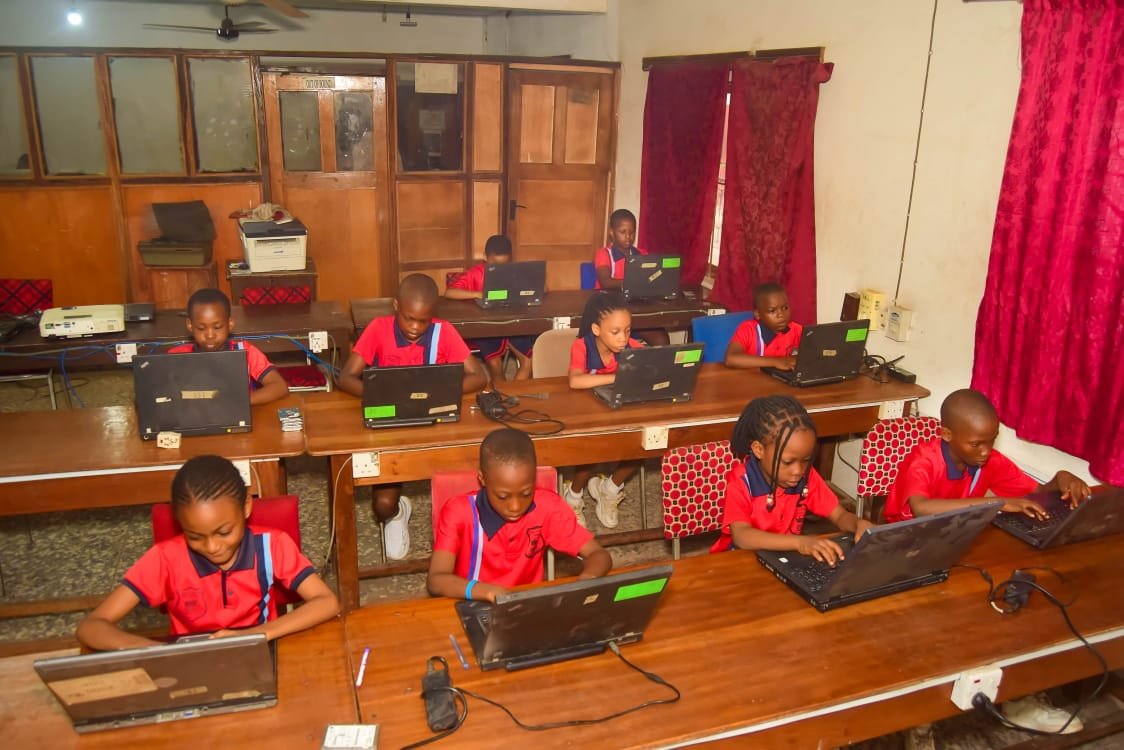
Pupils using laptops in Royal Crystal Academy ICT laboratory

Computer Laboratory Overview

Royal Crystal Academy is proud to operate a fully equipped ICT laboratory, giving every pupil from Basic 1 to Basic 6 hands-on access to computers as part of their regular learning. Our Nursery classes also enjoy supervised, screen-time-appropriate introductions to technology to build early familiarity before formal ICT lessons begin in Basic 1.

Each class has a scheduled weekly ICT period, supervised by our dedicated ICT Administrator, where pupils build practical digital skills alongside their core subjects.

20Laptops
6Class Levels
1:1Pupil-to-PC ratio

Computer Lab Rules

  1. Always wait for the ICT teacher before touching any computer
  2. No eating or drinking inside the laboratory
  3. Report any fault or damage immediately
  4. Shut down computers properly at the end of each session
  5. Internet use is supervised at all times

Facilities Available

πŸ’»

20 Laptops

Modern, well-maintained laptops with a near 1:1 pupil-to-PC ratio during practical sessions.

πŸ“Ά

Supervised Internet Access

Filtered, teacher-supervised internet for safe research and guided browsing.

πŸ”‹

Backup Power Supply

Uninterrupted lessons even during power outages.

πŸ“½οΈ

Projector & Display Screen

For whole-class demonstrations and coding walkthroughs.

πŸ–¨οΈ

Printer & Scanner

For pupils' project printouts and document scanning.

🧩

Educational Software

Typing tutors, Scratch, and age-appropriate creative and productivity tools.

ICT Curriculum for Basic 3 & Basic 4

The foundation years of the ICT Practical Programme β€” building real word-processing, spreadsheet and internet-safety skills.

Basic 3

Introduction to Word Processing

  • Opening and typing in a word processor
  • Formatting text β€” bold, font size, color
  • Saving and opening a file
  • Introduction to the internet (with supervision)
Basic 4

Spreadsheets & Internet Basics

  • Introduction to spreadsheets β€” rows, columns, simple data entry
  • Safe and supervised internet searching
  • Understanding email (concept-level)
  • Digital citizenship β€” staying safe online

ICT Curriculum for Basic 5 & Basic 6

The advanced years β€” presentations, block-based coding, and preparation for secondary school ICT.

Basic 5

Presentations & Intro to Coding

  • Creating simple slide presentations
  • Introduction to block-based coding (Scratch)
  • Basic computer troubleshooting awareness
  • Group ICT-based projects
Basic 6

Coding Fundamentals & Digital Projects

  • Block-based coding projects (Scratch) β€” games and animations
  • Introduction to typing-based coding concepts
  • Research and presentation skills using ICT tools
  • Preparation for secondary school ICT/computer studies

Practical Skills Pupils Will Learn

  • Confident typing and keyboarding
  • Word processing and document formatting
  • Basic spreadsheet data entry
  • Block-based coding with Scratch
  • Building simple slide presentations
  • Safe, supervised internet research
  • Digital citizenship & online safety
  • Basic computer troubleshooting
  • Teamwork through group digital projects

Benefits of Joining the ICT Practical Programme

πŸš€

Extra Practice Time

More hands-on time on a computer, beyond the regular weekly class ICT period.

🧠

Basic Computer Science Exposure

Simple, guided introduction to coding logic using Scratch, at a pace suited to the child's class.

🀝

Teamwork & Confidence

Group projects build collaboration and comfort working with others.

πŸŽ“

A Useful Foundation

Builds on the core ICT skills already taught in class, at a gentle, age-appropriate pace.

πŸ›‘οΈ

Safe, Supervised Practice

All sessions are supervised by our ICT Administrator.

πŸ†

Encouragement

Effort and progress are acknowledged along the way.

Class Schedule

The ICT Practical Programme runs weekly, after school, in two groups:

ClassesDayTime
Basic 3 & Basic 4Thursday12:45 PM – 2:15 PM
Basic 5 & Basic 6Friday12:45 PM – 2:15 PM

ICT Practical Programme Fee

Per Term
Loading…

Set by the school and payable once your application is approved. This amount may be updated by the school from time to time.

Frequently Asked Questions

Any currently enrolled pupil in Basic 3, Basic 4, Basic 5 or Basic 6.

Click "Enroll Now" on this page, fill in your child's and your details, and submit. You'll see a confirmation immediately, and the school will follow up regarding payment once your application is approved.

Your application is marked "Pending Approval" and reviewed by the ICT Administrator. Once approved, the programme fee becomes payable at the school office.

Group days are fixed by class level (Basic 3 & 4 on Thursday, Basic 5 & 6 on Friday) to keep lesson content age-appropriate.

Please contact the school office directly to discuss refund requests on a case-by-case basis.

Ready to Join?

Enroll your child in the ICT Practical Programme today β€” it only takes a minute.